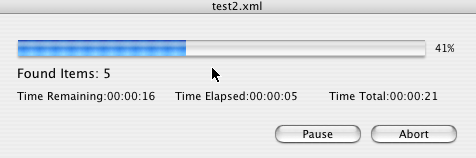
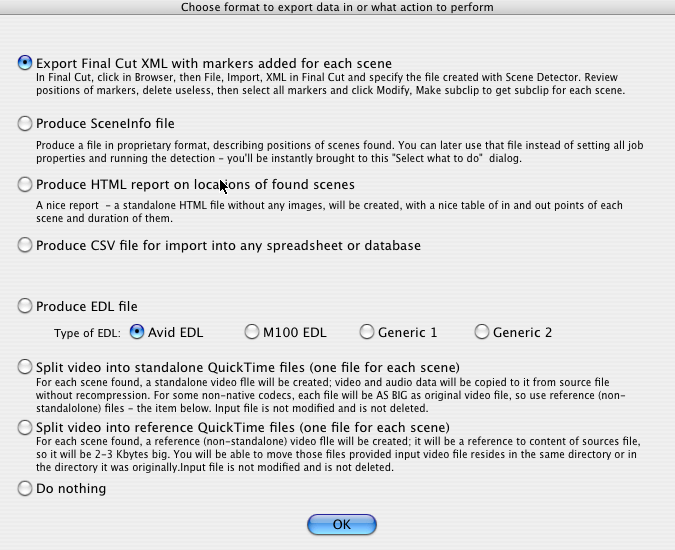
| Introducing: "Scene Detector v3.1"Scene Detector is an advanced utility for the automatic detection of scene boundaries (shots) in a movie. Scene detection is performed using only the frame image data, no timecode or audio metadata is used.Scene Detection opens a Final Cut project file (exported in XML format) OR raw video file (.mov or .avi or any other format supported by QuickTime), then asks the user what clip to detect scenes in (if input was not a raw video file). After completion it exports the project file in FCP XML format with markers added at scene boundaries OR exports scene information in CSV, HTML or EDL files (4 types of EDL files are supported). In case input was FCP XML file, markers will be added to original file, preserving all other information (all comments, clips, tracks and so on). If input was not an FCP XML file but media file, an FCP XML file will be generated, suitable for import into Final Cut or Final Cut Express. The User then imports the XML file back into Final Cut. In order to create subclips, user just selects all or some markers created by Scene Detector and then clicks Modify ⇒ Make Subclip in Final Cut, and a new subclip is created for each scene found by Scene Detector. It couldn't be any easier! The clip file is not changed during this operation, so it can reside even on your read-only device. Scene Detector can also create a separate video file for each scene found; both standalone and reference files can be created. New! Command line interface and ability to do scene detection in batches is available in Pro Edition of Scene Detector. The current version of Scene Detector is 3.1. Scene Detector Screenshots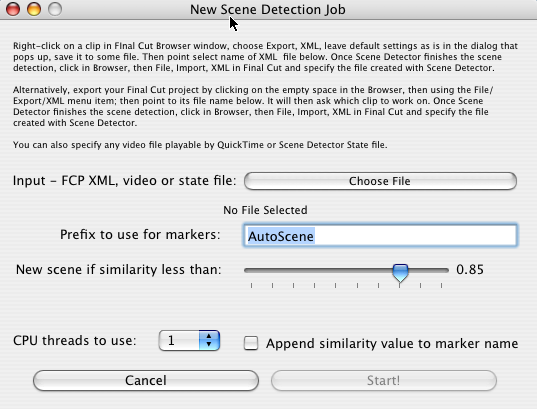
Main Screen


Scene Detector Features:
 Scene Detector can process all versions for the Final Cut file format - from version 1.0 (produced by Final Cut 2.0) to version 7.0 of the file format produced by Final Cut Pro.
Besides any version of Final Cut XML files, Scene Detector
can operate on raw media files directly (any media that can be opened by QuickTime
is supported).
It also supports opening its own "Scene Detector State" files and apply filtering (by threshold) to information contained in them. This way, one can produce such "Scene Detector State" file for big value of threshold, and then produce EDL files for different (lower) values of threshold without the need to rescan media for scenes.
Besides updating Final Cut XML files, Scene Detector can save information about
found scenes in HTML files (for viewing in the web browser in nice form),
CSV files (for export into database or processing using other tools)
or in EDL files in 4 formats.
Scene Detector can save information about cuts in its proprietary format too, that can be recalled afterwards for quick generation of other formats without conducting search for scenes again.
Scene Detector can produce a QuickTime video file, one per each scene. No recoding of
media will be performed, so there won't be any loss in quality.
Output files can be either standalone or reference files. In case of reference files, each output file will be about 2 KBytes in size, so you will be able to save space very effectively and even send it to your colleagues in seconds.
Scene Detector uses QuickTime library to decompress video. This means Scene Detector will work with all clip file formats that QuickTime can handle on your computer, including all MPEG files.
Scene Detector has a very advanced internal architecture. It allows the user to pause/resume or abort scene detection at any time. This is handy if the user wishes to assign CPU cycles on other high-priority tasks after scene detection has started.
Scene detection is a rather computation-intensive task that can be run on several CPUs at once. The user can select how many threads of execution to use for scene detection;
on quad-core Macs, the user will be able to load all CPU cores of computer
by selecting 4 or 8 threads for scene detection.
If the user wants to have one CPU core to be free for other tasks, they can select fewer CPU threads to use.
A patent-pending algorithm is used for scene detection. It allows for reliable scene detection,
and does this as fast as inhumanly possible.
For even faster scene detection speeds, the detection can be run on several CPU cores. The user interface has simple dropdown menus to select a number of CPU threads to start.
The detection of scenes is performed between a clip's In and Out points. This allows the user to avoid scanning a long media file in places where they don't need them, thus reducing the time it takes to complete the detection of selected scenes.
During scene detection, a value of similarity of subsequent frames is computed.
If the value computed is greater than the threshold specified by the user, the frames are
considered to belong to the same scene. Since the user has total control over the threshold,
they can control the count of "fake" scenes found by Scene Detector .
The less similarity threshold is, the less scenes are found.
During scene detection, a value of similarity between subsequent frames is computed.
If the value computed is greater than the threshold specified by the user,
the frames are considered to belong to the same scene.
Scene Detector has an option to append the similarity value to each marker which correspond to the scene found. That value measures similarity of the frame with its successor. Seeing a similarity as part of the marker name allows the user to prioritize their check of Scene Detector results; it also allows the user to make a decision on what threshold to use for another clip that has similar visual characteristics.
Scene Detector comes in two editions - standard and Pro. Pro Edition has command line interface
for running detection on single media file and storing scene information in either
FCP XML, CSV, HTML or EDL format.
A shell script comes with Scene Detector Pro for batch processing all files in a directory too. This document has more information about editions of Scene Detector.
How Scene Detector Works:Scene Detector performs complex image analysis comparing adjacent frames to compute their similarity. If a similarity value is less than the threshold amount, the frames are considered to belong to different scenes. A new marker is then inserted at the position of the first frame of a scene.Scene Detector uses QuickTime to decompress the frame's data. Scene Detector does not modify the clip file at all - it simply updates an Final Cut XML Project file inserting markers at places where the scenes were found. |
 |
||||||||||||||||||||||||

 |
 |
 |
 |
 |